> For the complete documentation index, see [llms.txt](https://help.immodio.app/llms.txt). Markdown versions of documentation pages are available by appending `.md` to page URLs; this page is available as [Markdown](https://help.immodio.app/en/anleitung/betriebskostenabrechnungen/heiz-und-warmwasserverbrauch/zahler-und-zahlerstande/getrennte-systeme-fur-heizung-und-warmwasser.md).
# Separate systems for heating and hot water
### Total consumption
In the first step you enter the respective **total consumption**. To do so, click **"Enter consumption"** in the **"Total consumption"** area.
{% hint style="info" %}
This means the hot water consumption of the **entire building**.
{% endhint %}
{% stepper %}
{% step %}
### Heating of the heating system and the hot water
You can now choose whether the heating and the hot water are heated by **two separate systems** (for example with central heating where electric instantaneous water heaters are installed in the individual units to heat the hot water) or whether the heating and the hot water are heated by **the same system**.
{% hint style="info" %}
In this case consumption is treated as two **"separate systems"**. If you need help with consumption in a **"same system"**, you can find further information [**here**](/en/anleitung/betriebskostenabrechnungen/heiz-und-warmwasserverbrauch/zahler-und-zahlerstande/gleiches-system-fur-heizung-und-warmwasser.md).
{% endhint %}
{% endstep %}
{% step %}
### Total consumption for heating
In the next step the total consumption for the heating is determined.
#### **A. Energy source according to the master data**
The value shown for **"Energy source according to the master data"** is taken automatically from the [features](/en/anleitung/immobilien/objekt/ausstattung-objekt.md) stored in the property and can be adjusted there if required.
#### **B. Hi value of the energy source**
The Hi value (calorific value) states how much energy is contained in one unit of a fuel, for example how many kWh are produced from one litre of heating oil or one cubic metre of gas. In the heating cost statement this value is used to convert fuel quantities into kWh and to calculate the heating and hot water costs correctly.
Immodio automatically uses the official values under **Section 9 (3) of the Heating Costs Ordinance (HeizkostenV).** If your energy supplier gives you a Hi value adjusted specifically for your energy source, you can change it if required.
{% hint style="info" %}
You can find further information on the Hi value of the energy source and an overview of the Hi values of other energy sources [**here**](https://www.gesetze-im-internet.de/heizkostenv/__9.html).
{% endhint %}
#### **C. Quantity of the energy source**
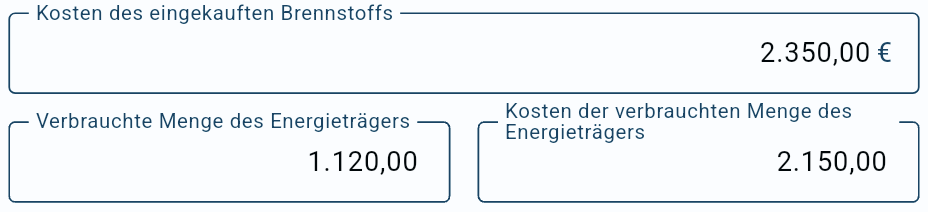
The values shown here for the quantity purchased and the associated unit of quantity (here litres) relate to the entries created under **Income and expenditure** in the category **"All costs for heating incl. maintenance, no repairs (recoverable from tenant)"**.
{% hint style="info" %}
As this is "**separate systems for heating and hot water"**, the entry has to be made in the category heating **AND** hot water.
{% endhint %}
#### **D. Unit of quantity of the energy source**
Select here the unit of quantity in which the consumption of the energy source is stated on your invoice.
If your invoice already states the consumption in **kWh**, you should select **kWh** and take the kWh value directly from the invoice. In that case no conversion from cubic metres, litres or kilograms is necessary. That is generally more accurate, because the details from the energy supplier or fuel supplier are based on the specific invoice.
**Example:**
Your gas invoice states not only a gas consumption in m³ but already a calculated energy consumption of **5,000 kWh**. In that case select **kWh** as the unit of quantity and enter these **5,000 kWh** under "Purchased quantity of the energy source".
If, on the other hand, your invoice states the consumption only in the usual unit of quantity of the energy source, for example natural gas in m³, heating oil in litres or pellets in kg, select that unit of quantity. Immodio then converts the consumption into kWh using the Hi value.
{% hint style="warning" %}
**Important**: For an energy source, use either the usual unit of quantity or kWh within the statement. The quantities are not mixed. If you select **kWh** here, for example, Immodio only takes into account entries for that energy source which were also recorded with the unit of quantity **kWh**. Entries with a different unit of quantity are not taken into account in this calculation.
{% endhint %}
#### **E. Where there is a gas or oil tank**
If you have stated in the property's master data under [Features](/en/anleitung/immobilien/objekt/ausstattung-objekt.md) that there is a **gas or oil tank** for the property, the following input fields are shown to you in the heating cost statement when the total energy consumption is calculated:
With heating oil, LPG or pellets, the quantity purchased in the billing year does not necessarily correspond to the quantity actually consumed in the same period. The reason is that the central tank stock is usually neither completely empty nor completely full at the beginning and end of the settlement period.
If, for example, the tank is filled at the end of the year shortly before the settlement date, that delivery has been paid for but has correspondingly not yet been fully consumed. Conversely, fuel purchased in the previous year can be consumed during the current year. The opening stock therefore also has to be taken into account.
**Determining the quantity consumed**
To determine the quantity consumed, the stock of the energy source at the beginning and at the end of the settlement period is normally used. The quantity consumed results from the following calculation:
> "Deliveries during the settlement period" − "Closing stock" = "Quantity consumed"
* With an oil tank the opening and closing stock is usually determined using the tank gauge, an electronic level indicator or a dip measurement with a dip table. If the tank gauge shows only a percentage level, this has to be converted into litres on the basis of the tank volume.
* With an LPG tank the tank level at the beginning and at the end of the settlement period can likewise be used. In some installations a gas meter or LPG consumption meter is also fitted. In that case the quantity of gas consumed can be determined from the difference between the meter readings. Depending on the installation and the basis of billing, a conversion may then be necessary, for example from m³ into kWh or into another billing unit used.
{% hint style="info" %}
What matters is that the opening stock, the deliveries and the closing stock, or the meter readings, are documented comprehensibly. Only in this way can it be ensured that the heating and hot water statement uses the quantity actually consumed during the settlement period rather than the quantity purchased.
{% endhint %}
{% endstep %}
{% step %}
### Total consumption for hot water
#### A. Reading meters
This option should be used where there is a heat meter with a corresponding meter reading that directly measures the amount of heat used to produce the hot water.
To determine the total consumption in kWh for heating the hot water from the meter readings taken, click the meter shown for the hot water.
If no meter is shown to you, no suitable meter has been created in the property.
{% hint style="info" %}
Meters are only shown where they were selected from the preselected list of meter types when they were created in the property.
A space you have added manually in the meter type, for example, can also mean that the meter is no longer recognised automatically.
{% endhint %}
You can now select the "**opening meter reading**" and the "**closing meter reading**" of the respective meter.
To do so, click the field for the **opening** or **closing meter reading** and select the appropriate reading from the list of meter readings stored in Immodio.
{% hint style="info" %}
Immodio automatically suggests the appropriate opening and closing meter reading, using the meter reading closest to the **start of the billing period** and the **end of the billing period**, provided it was recorded at most **three** **days** before or after.
{% endhint %}
#### B. Manual entry
Alternatively you can enter the total consumption in kWh for heating the hot water manually. To do so, click **"Manual"** and then enter the quantity in kWh.
This option can be used where the value is already available from a statement, an external calculation or another reliable source. That can be the case, for example, where a metering service provider or energy supplier has already stated the share of energy used for producing the hot water.
#### C. Calculation using the formula
With this option Immodio calculates the consumption for heating the hot water automatically using the statutory formula:
```
2.5 × hot water consumption × (flow temperature − 10)
```
The formula can be used where:
1. there is no directly measured meter reading for producing the hot water,
2. the total hot water consumption in cubic metres is known,
3. and the average flow temperature can be stated plausibly.
The formula is intended above all for cases in which the share of energy used to produce the hot water is not measured directly but can be calculated comprehensibly on the basis of the hot water consumption.
{% hint style="info" %}
The formula under Section 9 of the Heating Costs Ordinance serves to determine the amount of heat attributable to central hot water production by calculation where that amount of heat cannot be measured with a heat meter or where measuring it would be possible only at unreasonably high expense. Where a measured heat meter value for hot water production is available, that value should be used.
{% endhint %}
**Flow temperature in the master data**
You can maintain the flow temperature in Immodio in the [property](/en/anleitung/immobilien/objekt.md) under [Features in the Technical systems area](/en/anleitung/immobilien/objekt/ausstattung-objekt.md#technical-systems). This detail is only shown to you where you have stated under the energy-related features in the property that there is **central heating**.
{% endstep %}
{% endstepper %}
### Help with notices
**Heating costs entered in the wrong category with "Separate systems"**
This message appears where "**Separate systems**" has been selected but there is already an entry in the category "Heating **AND** hot water (recoverable from tenant)". That category is only intended for cases in which heating and hot water are supplied by the same system and the costs are initially incurred jointly (same system).
Please check the existing entries and the master data stored in the property under [Technical systems](/en/anleitung/immobilien/objekt/ausstattung-objekt.md#technical-systems) and assign the costs to the appropriate categories. "Separate systems" can then be selected.
* **Category for hot water with separate systems:** *All costs for hot water incl. maintenance, no repairs (recoverable from tenant)*
* **Category for heating with separate systems:** All costs for heating incl. maintenance, no repairs (recoverable from tenant)
**Differing unit of quantity for heating or hot water costs**
This warning appears where, under [Income and expenditure](/en/anleitung/einnahmen-und-ausgaben.md), a unit of quantity was used in at least one entry for the heating costs or hot water costs that does not match the unit of quantity of the stored energy source.
**Example:** In the master data the unit cubic metres is stored for the energy source natural gas, but in an entry the quantity was recorded in litres or kWh.
In this case Immodio cannot use the entry unambiguously for the calculation. The entries concerned are therefore not taken into account when the consumption and CO₂ values are calculated.
Please check the entries concerned and make sure that the quantity is recorded in the same unit as the energy source in the master data.
**The total quantity of water is considerably higher than the sum of the individual meters**
Measurement differences between the main water meter and the individual meters may only be allocated pro rata to the users up to a limit of about 20%.
Where this limit is exceeded, however, this indicates non-recoverable additional consumption, for example due to measurement errors, pipe losses or unrecorded draw-off points. In that case only the sum of the individual meters can be billed. Please check the meter readings and reading dates.
***
### Calibration of the meters
Where billing is based on meter readings, the meters generally have to be usable under calibration law. Under Section 37 of the German Measurement and Calibration Act, measuring devices may not be used uncalibrated once the calibration period has expired.
{% hint style="info" %}
For water meters the calibration period is generally 6 years under Section 34 of the German Measurement and Calibration Ordinance in conjunction with Annex 7 of that ordinance.
{% endhint %}
.png?alt=media)
.png?alt=media)
.png?alt=media)
.png?alt=media)
.png?alt=media)
.png?alt=media)
.png?alt=media)
.png?alt=media)
.png?alt=media)
 {% endhint %}
You can now select the "**opening meter reading**" and the "**closing meter reading**" of the respective meter.
{% endhint %}
You can now select the "**opening meter reading**" and the "**closing meter reading**" of the respective meter.
.png?alt=media)
.png?alt=media)
.png?alt=media)
.png?alt=media)
.png?alt=media)
.png?alt=media)
.png?alt=media)