> For the complete documentation index, see [llms.txt](https://help.immodio.app/llms.txt). Markdown versions of documentation pages are available by appending `.md` to page URLs; this page is available as [Markdown](https://help.immodio.app/en/anleitung/mietverhaltnisse/mietverhaltnis-anlegen/raume.md).
# Rooms
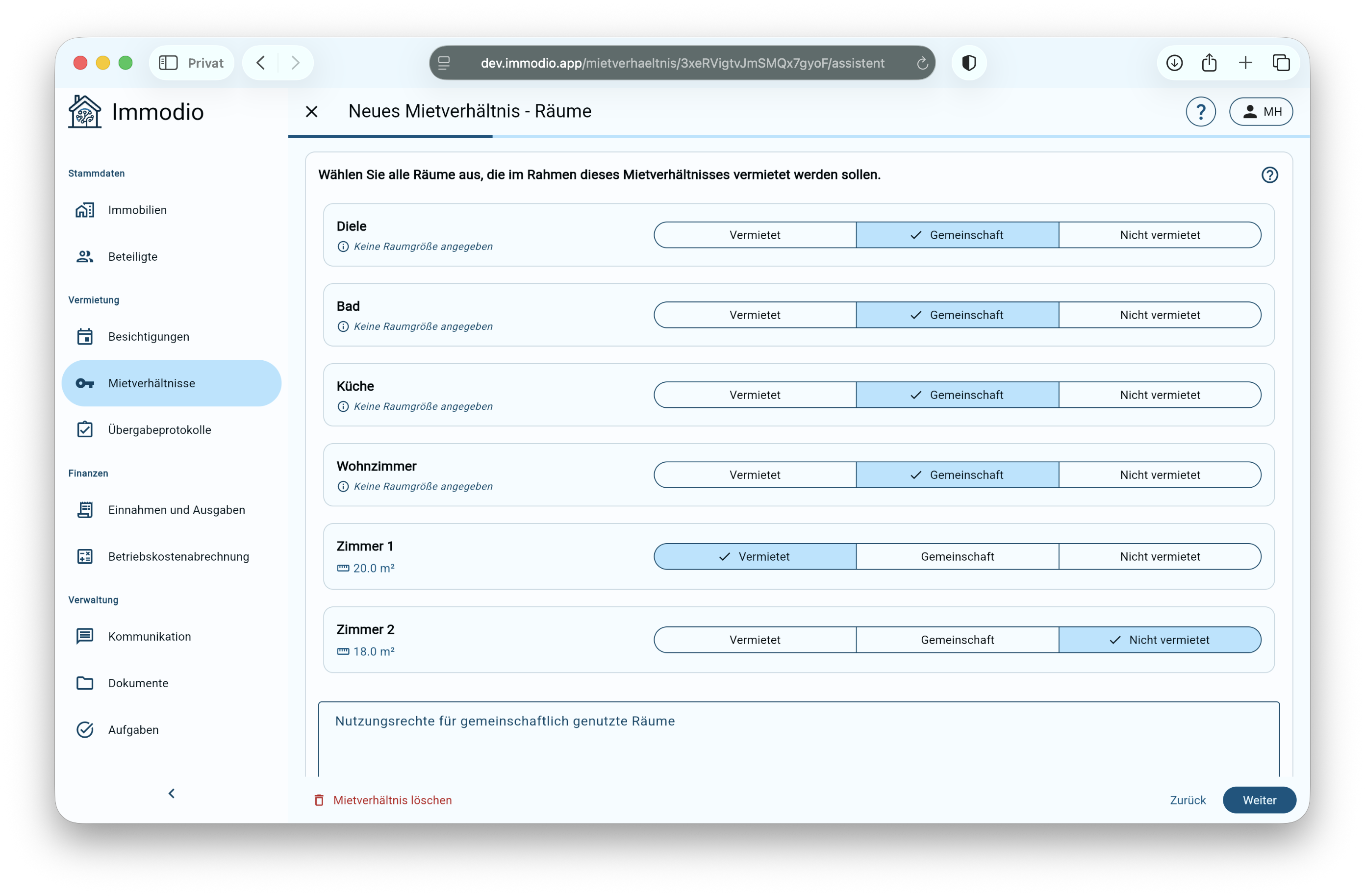
This page explains how to assign the rooms of a unit correctly in a shared apartment rental agreement.
## Rooms
#### Assigning rooms in a shared apartment letting
In this step you define which rooms are **let exclusively**, **used communally** or **not let** within the shared apartment tenancy. This is particularly important when letting individual rooms in a house share, so that it is clearly defined what the rented property covers. Choose here between:
"Let" – the room in the house share provided to the tenant for their sole use
* Only this room constitutes the actual room being let in the house share.
* The rented property therefore covers only this room; all other rooms are either communal rooms in which the tenant receives a right of use, or rooms that are not let and in which the tenant therefore receives no right of shared use.
* **Several rooms** in one unit can also be let to the tenant as rooms for their exclusive use.
* In a shared apartment letting, certain rooms are typically used communally alongside the room let exclusively.
* The tenant is granted a communal right of shared use in these rooms.
* Rooms let to other tenants for their exclusive use (for example other rooms in the house share) expressly **do not** count here.
* **Examples of communal rooms:**
* kitchen
* bathroom
* living room
* hallway
* storage room
* attic / tenant's cellar
"Not let" – these rooms are let to other tenants as rooms in the house share
* These rooms are not let to the tenant under this rental agreement and they have no right of shared use.
* **Examples of rooms that are not let**
* Another room in the house share that is let separately to a further tenant.
* A room that is not let or is used by the landlord themselves.
{% hint style="info" %}
For this selection to be made correctly, it is important that the unit has previously been maintained with all its rooms and their names. Ideally use the room names from the unit's floor plan (where one exists) in order to avoid assignment errors later. If a floor plan is stored in the unit, it is made available to the tenant in the tenant portal.
Alternatively the rooms can be labelled with small number plates (for example room 1, room 2). This numbering can then also be used for the room names.
{% endhint %}
#### Rights of use
In this optional text field you can **additionally define** what rights the tenant has in the communally used rooms. Here you can regulate, for example, the extent to which use is permitted.
#### Detailed description of the location
This field serves to describe **precisely where** the let room is within the unit (apartment).\
\
A clear description of the location is particularly important for the rental agreement, so that the let space is **unambiguously identifiable**.
* Describe here **exactly where the let room in the house share is located**, using objective details wherever possible (for example "House share room 1: the second room on the left seen from the entrance").
* **Optional:** You can also state the **location of other rooms** (rooms that are not let or communal rooms). Since this description applies globally to all rooms, **always put the room name first** (for example "Kitchen: the middle room facing the courtyard, seen from the entrance").
* If you have stored a floor plan for the unit and base the room names on it, this helps with precise assignment. The floor plan stored in the unit is transferred to the tenant's tenant portal automatically.