> For the complete documentation index, see [llms.txt](https://help.immodio.app/llms.txt). Markdown versions of documentation pages are available by appending `.md` to page URLs; this page is available as [Markdown](https://help.immodio.app/en/anleitung/ubergabeprotokolle/ubergabeprotokoll-aus-mietverhaltnis-erstellen.md).
# Creating a handover report from a tenancy
This page explains how to create a handover report from within a tenancy.
If a tenancy has the status **"Signed", "Let", "Terminated"** or **"Ended"**, clicking the tenancy shows a **"Create handover report"** button at the bottom right. Clicking the button takes you into the handover report assistant, which guides you step by step through all the relevant points of your apartment handover.
{% stepper %}
{% step %}
### Tenancy documents
* Use the **"Tenancies"** menu item to select the tenancy you want to document a handover for.
* Then click the **"Documents"** tab within the tenancy. In the **"Handover reports"** folder, click the **"Create handover report"** button.
{% endstep %}
{% step %}
### Occasion
* Select the appropriate occasion for creating the report.
* The report is adapted automatically to the occasion you choose.
{% endstep %}
{% step %}
### Participants
* Add everyone present at the handover here.
* To do so, click **"+ Add another participant"** and record the name and role of each participant.
* You can also add any witnesses at this step.
* Once you have recorded all participants, click **"Continue"**.
{% hint style="info" %}
Clicking a participant marks them as **present** or **absent**. Only participants who are present are listed in the handover report and can then sign the report digitally.
{% endhint %}
{% endstep %}
{% step %}
### Fixtures from the previous tenant
* Document here all items and fixtures that the new tenant takes over from the previous tenant and that remain in the unit. This also includes structural changes such as wallpaper, floor coverings owned by the tenant, or extensions and conversions.
* This makes clear that they are not part of the rented property and that there is therefore **no obligation on the landlord to maintain or repair them**.
{% endstep %}
{% step %}
### Defects
In the **"Defects"** tab you see all **existing defects of the** [unit.](/en/anleitung/immobilien/einheit/ausstattung-einheit.md)\
By default **all defects are preselected with a tick** and therefore appear in the **handover report**.
* **Deselect:** Remove the tick next to the defect concerned if it is not to be listed in the report.
* **Edit:** The **pencil icon** lets you adjust or update existing defects.
* **Add new:** [**"+ Create defect"**](/en/anleitung/immobilien/mangel/mangel-anlegen.md) lets you record new defects. They are assigned to the unit automatically and shown in the report.
{% endstep %}
{% step %}
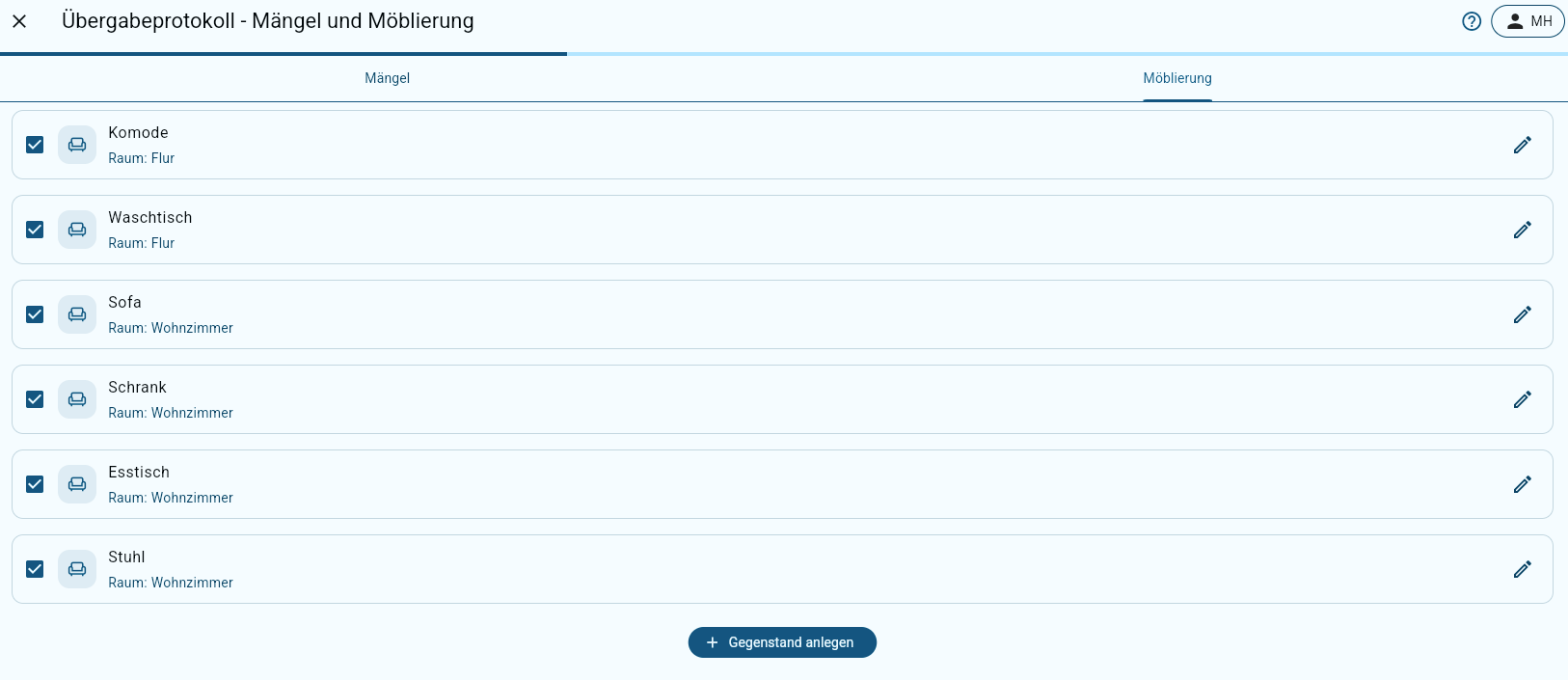
### Furnishing
In the **"Furnishing"** tab you see the [furnishing](/en/anleitung/immobilien/einheit/ausstattung-einheit.md#furnishing) stored in the [unit](/en/anleitung/immobilien/einheit/ausstattung-einheit.md).\
All furnishing items are **preselected with a tick by default** and are therefore shown in the **handover report**.
* **Deselect:** Remove the **tick** if an item is not to appear in the report.
* **Edit:** The **pencil icon** lets you adjust or add to existing entries.
* **Create new:** [**"+ Create item"**](/en/anleitung/immobilien/einheit/ausstattung-einheit.md#furnishing) lets you add further pieces of furniture. They are assigned to the unit automatically and shown in the report in future.
{% endstep %}
{% step %}
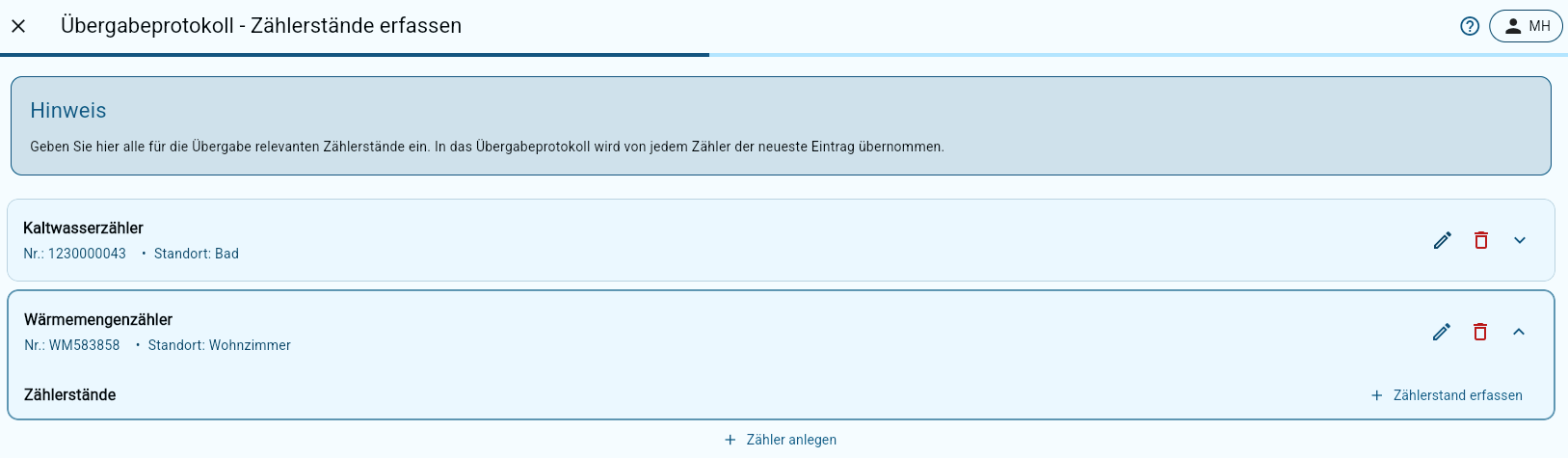
### Recording meter readings
Here you record all **meter readings relevant to the apartment handover** (for example water, heat, electricity).\
\
For every existing meter, the **latest meter reading is adopted automatically in the handover report**.
* **Record meter reading:** Click **"Record meter reading"** to add a new meter reading.
* **Create meter:** **"Create meter"** lets you record further meters (for example a new electricity or water meter).
* **Edit:** The **pencil icon** lets you adjust existing meter data.
* **Delete:** The **bin icon** lets you remove meters that are no longer needed.
{% endstep %}
{% step %}
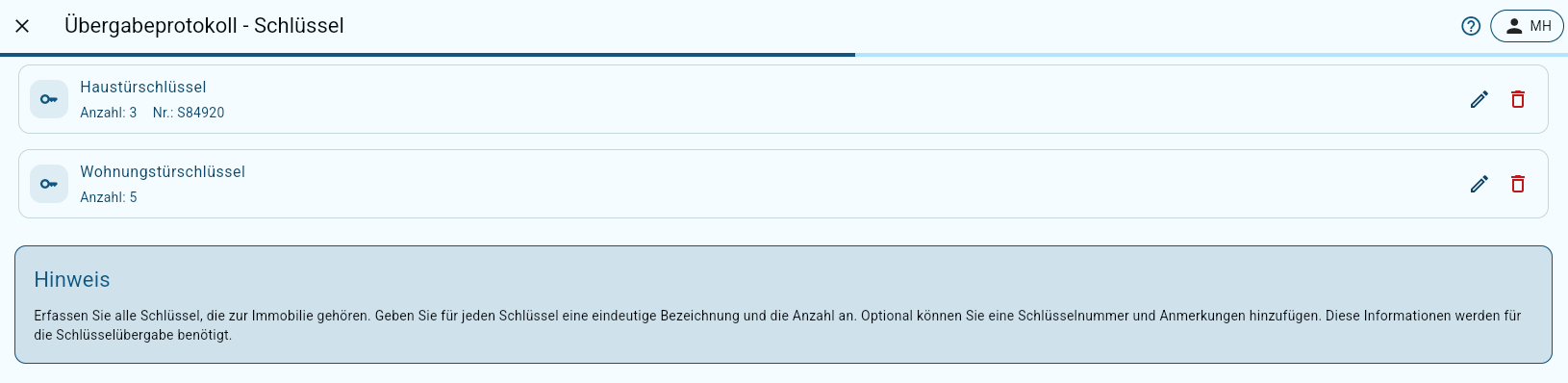
### Keys
Under **Keys**, all [keys](/en/anleitung/immobilien/einheit/schlussel-einheit.md) stored in the [unit](/en/anleitung/immobilien/einheit/schlussel-einheit.md) (from the last handover) are adopted automatically.
* **Create key:** Record new keys under **"+ Create key"**
* **Edit:** The **pencil icon** lets you edit existing keys and their quantity.
* **Delete:** The **bin icon** lets you remove keys that are no longer needed.
{% endstep %}
{% step %}
### Other agreements
* Enter further information about the handover here, for example individual arrangements, particular notes, deadlines for remedying defects or other relevant agreements between you as the landlord and your tenant.
* This information is documented in the handover report and serves as a binding supplement to the handover.
{% endstep %}
{% step %}
### Draft and signature
* You now see the **draft of the handover report** and can review the details together with all participants.
* Clicking **"Continue"** starts the **signing process**.
* Click the **participant's name** and hand over your **mobile device** for the digital signature. The participant can either sign or refuse to sign.
### Clicking "Sign"
* If the participant agrees with the content of the handover report, they confirm that they have read the privacy policy and sign in the signature field provided.
* Clicking the **"Sign"** button adopts the signature.
Clicking "Without signature"
* If a participant refuses to sign or is not present in person, the **"Without signature"** button can be chosen.
* In this case a reason for the missing or refused signature has to be given, which is documented in the report.
* The reason can optionally be explained in more detail in a free text field.
* Clicking **"Confirm"** completes the process and records the participant in the report without a signature.
* Once everyone involved has signed (or refused to sign), the finished report is created automatically and can be viewed under the **"Handover reports"** menu item or in the tenancy concerned, and downloaded if needed.
{% endstep %}
{% endstepper %}
### Sending the handover report to your tenant
Once the apartment handover is complete, the signed handover report is sent to the tenant automatically, provided they are registered in the [tenant portal](/en/wissen/mieterportal.md). The report is then made available directly in the tenant portal in the tenancy concerned. The tenant is also informed by email if they have already confirmed their email address.
The report is sent regardless of whether the tenant is already registered in the tenant portal at the time of the apartment handover or is only invited to the tenant portal after the handover. As soon as they have access to the tenant portal, the handover report is synchronised automatically and made available there.
You can find more information on invitations to the tenant portal [**here**](/en/wissen/mieterportal/einladung-in-das-mieterportal.md).
.png?alt=media)
.png?alt=media)
.png?alt=media)
.png?alt=media)
.png?alt=media)
.png?alt=media)

.png?alt=media)
.png?alt=media)